
COMMAND: Improving Residential Estate Monitoring

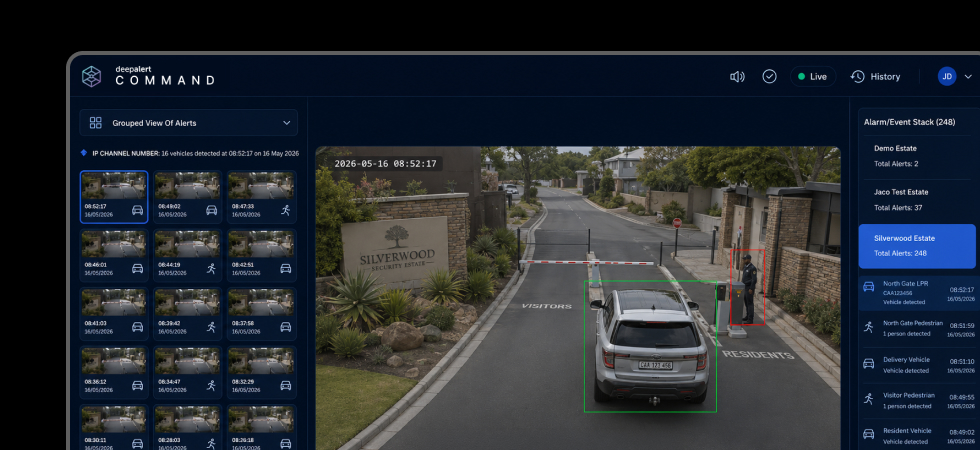
Our previous article introduced COMMAND and what it means for residential estate monitoring. This time, we’re looking at the practical changes: what operators and guards see on screen, what changes for security managers, and how estates can transition from DeepAlert’s legacy interface without disrupting day-to-day monitoring.
Five changes that matter
1. One fixed queue → a workspace built around the control room
The legacy interface provided a single alert queue.
COMMAND introduces detachable alert stacks that can be arranged across multiple screens and configured around the way a monitoring team works.
For an estate, that could mean monitoring from a gatehouse, an outsourced control room, or a combination of both. Each environment can organise alerts around its own operational requirements rather than working from the same fixed layout.
2. One camera at a time → multi-camera situational awareness
An alert from a gate, perimeter or common area often needs more context than the triggering camera alone can provide.
COMMAND’s grid view allows operators to open multiple relevant cameras from the same site directly from the alert workflow. Instead of moving between feeds individually, they can quickly establish what is happening across the surrounding area before deciding how to respond.
3. Basic site details → response information in one place
During an incident, guards should not have to search through spreadsheets, folders or message groups for the information they need.
COMMAND brings SOPs, key holder and management contact details, site notes and event history into the same workflow as the alert.
The information required to make a decision is available where the decision is being made.
4. Security and maintenance events → separate workflows
A camera going offline requires attention, but it does not require the same response as a person detected along the perimeter.
COMMAND separates camera and system health notifications into a dedicated maintenance stack. Security alerts remain focused on events that require an operator or guard to assess and respond.
This makes it easier to manage technical issues without adding unnecessary noise to the primary security queue.
5. A new interface → the same DeepAlert verification underneath
COMMAND changes the way verified alerts are presented and managed. It does not replace the DeepAlert AI responsible for analysing those events.
The same DeepAlert detection technology continues to filter nuisance triggers before alerts reach the operator.
The operator workflow improves. The verification layer underneath it remains in place.
A phased transition to COMMAND
Moving to COMMAND does not require an estate to change its entire monitoring operation at once.
The transition can be managed in stages:
- Start with selected cameras or areas. A defined part of the estate moves to COMMAND while the rest continues operating as normal.
- Validate alert delivery and timing. The monitoring team can confirm that events are reaching COMMAND correctly before extending the deployment.
- Keep the existing camera infrastructure. There is no requirement to replace supported cameras or make firmware changes simply to adopt COMMAND.
- Retain your legacy interface during evaluation. Teams can become familiar with the new workflow while the existing interface remains available.
This allows estate management and security teams to evaluate COMMAND within their own operational environment before rolling it out more broadly.
What changes for the people using it?
For a guard or operator, COMMAND reduces the steps between receiving an alert and deciding how to respond. Relevant cameras, SOPs and contacts are available within the same workflow.
For a security manager or supervisor, it provides a clearer record of how events were handled, with alert history and operator actions available in one place.
For HOA estate management, it provides greater visibility into the monitoring operation. Security events are handled through a more consistent process, while camera and system health issues are surfaced separately before they develop into gaps in coverage.
Same camera estate. A more efficient monitoring workflow.
COMMAND does not change the fundamental job of the estate’s security team. It improves the workflow around it.
Operators spend less time searching for information. Maintenance events no longer compete with security alerts. Multiple cameras can be reviewed quickly when additional context is required.
Each change is relatively simple. Across a busy control room and thousands of events, they can make a meaningful difference to how efficiently an estate is monitored.
Related Articles